
Industrial devices rarely speak the same communication language. A temperature controller may use Modbus RTU over RS-485, while a supervisory system expects Modbus TCP through Ethernet. A Modbus Converter bridges these environments by translating data between compatible protocols or physical interfaces. In simple terms, it receives a request, interprets the message, and sends the equivalent command onward. The process sounds straightforward. Configuration details matter.
Most converters support serial settings such as baud rate, parity, stop bits, and slave address. Ethernet models may require an IP address, port number, and operating mode. Some units provide electrical isolation, surge protection, status LEDs, and diagnostic tools. These features help technicians trace a silent register, loose terminal, or incorrect wiring. A reliable installation also checks register maps, byte order, response timing, and grounding. Small mismatches can produce believable but incorrect values. That risk deserves attention.
This guide explains how a Modbus Converter works, where it fits, and how to select one responsibly. It considers real cabinet conditions, including long RS-485 cables, electrical noise, and limited maintenance access. It also distinguishes protocol conversion from simple signal conversion, because the two are often confused. A converter cannot repair an invalid register map or replace sound network design. That is an important limitation. Reviewing manuals, testing with known values, and documenting every setting improves confidence. The goal is not merely to connect devices, but to create a stable, understandable data path that operators can trust.
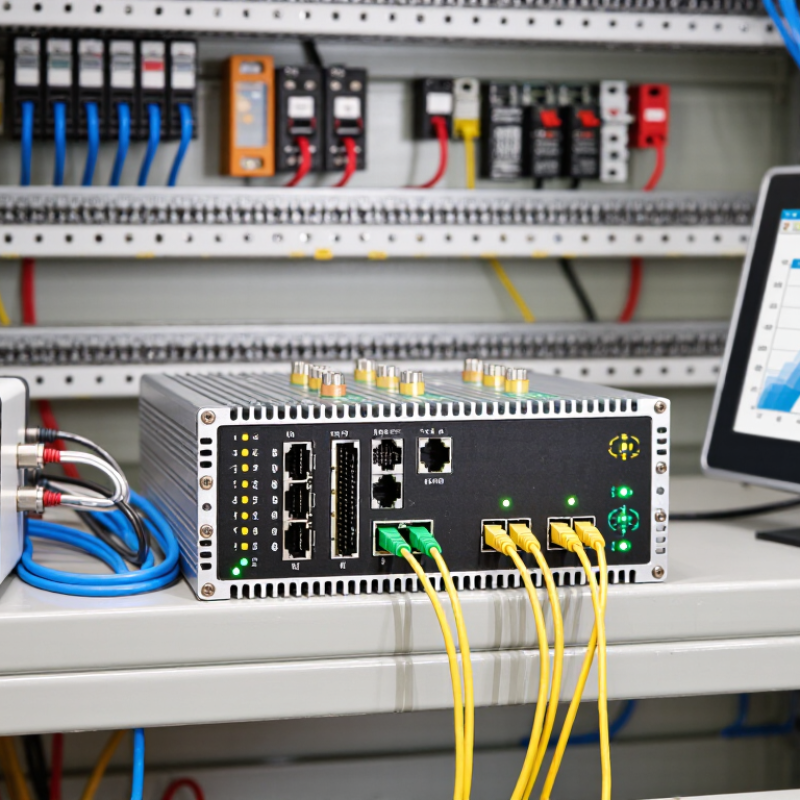
A Modbus converter is a communication device that connects different Modbus networks or physical interfaces. It commonly links Modbus Rtu Devices over RS-485 with Modbus TCP equipment on an Ethernet network. In practical installations, this allows a controller to read data from meters, sensors, or drive systems using different connection methods. The converter receives a Modbus request, interprets its format, and sends a compatible message to the other network. It then returns the device response to the original controller.
The device usually requires settings for baud rate, data bits, parity, stop bits, and slave address. Ethernet-based models also need an IP address and communication port. Some converters offer isolation, which helps reduce electrical noise and protects connected equipment. This matters in factories where long cables run beside motors or power lines. However, the term “converter” is not always used consistently. Some products only change electrical signals, while others translate complete Modbus messages. Checking the technical manual is essential. Guessing can create silent communication failures.
Tips: Match the converter with the required Modbus mode, interface, and network speed. Test one device before expanding the system. Check wiring polarity, termination resistance, and duplicate addresses. A blinking status light does not prove that data is correct. Read the actual register values. Record every setting for future maintenance.
A Modbus converter links devices that speak different communication languages. Common examples include Modbus RTU over RS-485 and Modbus TCP over Ethernet. Its core components include a transceiver, microcontroller, isolated power circuit, firmware, and terminal connections. The transceiver changes electrical signals. The firmware translates message formats and manages timing. Isolation helps protect field equipment from voltage differences and noise. Status LEDs also provide quick clues during commissioning. A 2024 industrial network study reported Ethernet at about 71% of industrial connections, while fieldbus remained near 22%. This gap explains the converter’s continuing role.
The communication interface determines how data moves. RS-485 supports balanced, multi-drop wiring across factory floors. Ethernet offers faster transmission and easier integration with supervisory systems. USB may assist local configuration, although it is rarely the main field interface.
Some converters also provide serial ports, digital inputs, or gateway functions for older equipment. IoT Analytics reported 14.4 billion connected IoT devices worldwide in 2023. More connected assets create more protocol boundaries. There is no magic. A converter cannot repair incorrect baud rates, reversed polarity, missing termination, or duplicated slave addresses. Commissioning teams often find these small errors first.
My practical caution is simple: verify wiring before blaming firmware. Even a well-designed converter can fail when the interface settings are assumed rather than measured.
A Modbus converter links devices that use different communication methods. It commonly connects serial Modbus RTU equipment with a Modbus TCP network. Its job involves translation, timing, and controlled message delivery. The process sounds tidy. In practice, wiring and settings cause many failures.
Step 1 begins when a client sends a request through the network. The request identifies a slave address, function code, register, and data length. The converter receives this TCP packet and checks its structure. It then removes the network wrapper and prepares a serial Modbus RTU frame. The converter applies configured values, such as baud rate, parity, stop bits, and interface mode.
Step 2 sends the frame across the serial line. The addressed device reads the request and checks the function code. It also verifies the message using a cyclic redundancy check. If the frame is valid, the device returns data or an exception response. The converter captures that response, checks timing, and packages it into a TCP message.
Step 3 delivers the message to the original client. A timeout appears when the device stays silent.
Good commissioning includes testing one register before expanding the system. Check polarity, grounding, address settings, and cable length. A correct IP setting cannot repair reversed serial wires. That detail is easy to miss. Engineers should record each change during testing. Without records, troubleshooting becomes guesswork, and even an experienced technician may repeat the same mistake.
What Is a Modbus Converter and How Does It Work?
Common Modbus Conversion Types and Protocols
A Modbus converter translates messages between communication layers. The most common example is Modbus RTU over RS-485 to Modbus TCP over Ethernet. RTU uses binary frames, device addresses, and error checks. TCP carries similar data through Ethernet, normally using port 502. The converter rebuilds each message without changing the intended register value. It does not magically repair incorrect addressing.
Modbus ASCII to RTU conversion is another practical option. ASCII frames are easier to inspect during troubleshooting, but they use more bandwidth. RTU is usually faster and more efficient. Serial converters may also bridge RS-232 and RS-485 signals. This is a physical-layer change, not always a protocol conversion. Technicians must still check baud rate, parity, stop bits, wiring polarity, and termination resistance. One overlooked setting can stop an entire data chain.
A 2024 Industrial Network Market Share report estimated that Ethernet-based networks represented 68% of new industrial installations, compared with 32% for traditional fieldbus systems. That shift explains the demand for RTU-to-TCP gateways. However, legacy meters and controllers remain common. The Modbus Application Protocol Specification identifies function codes for reading coils, inputs, and registers. Real installations can still expose gaps, especially with swapped registers or unusual byte order. Testing with a known temperature value helps. Small details matter.
What Is a Modbus Converter and How Does It Work?
A Modbus converter links devices that use different communication interfaces or network formats. A common example connects Modbus RTU over RS-485 with Modbus TCP over Ethernet. It receives a request, interprets the data frame, and sends the message through the required interface. The converter usually preserves register addresses, function codes, and error-checking information. In a factory, this allows a temperature controller on a two-wire bus to communicate with a monitoring computer. Communication may look simple. Wiring rarely is.
Applications depend on the equipment, distance, and operating conditions. Water treatment panels, energy meters, building controls, and machine lines often use these converters. Selection should begin with protocol compatibility, not price. Check whether the device supports RTU, ASCII, TCP, or multiple modes. Confirm baud rate, parity, slave addresses, and maximum bus length. Galvanic isolation is valuable near motors, relays, and variable-frequency drives. It can reduce damage from ground potential differences and electrical noise. Also inspect terminal design, enclosure rating, mounting method, and operating temperature. Ethernet features such as static IP settings and diagnostic logs can simplify commissioning. However, more features do not always mean better performance. A converter with complicated configuration may slow maintenance during a fault. Test one unit with the actual cable, devices, and traffic pattern before wider installation. Small tests reveal assumptions that manuals sometimes hide.
| Dimension | Key Information | Typical Options or Values | Selection Considerations |
|---|---|---|---|
| Definition | A Modbus converter is a communication device that translates Modbus messages between different physical interfaces or network protocols. | Serial-to-Ethernet, Ethernet-to-serial, USB-to-serial, or protocol gateway. | Choose a converter that supports both the required Modbus mode and the interfaces used by the connected equipment. |
| Supported Modbus Modes | Modbus RTU and Modbus ASCII commonly operate over serial links, while Modbus TCP operates over Ethernet networks using TCP/IP. | Modbus RTU, Modbus ASCII, Modbus TCP, or RTU-to-TCP conversion. | Verify that the converter supports the exact source and destination modes rather than only the physical connector types. |
| Serial Interface | Serial Modbus networks use differential or single-ended electrical interfaces depending on the installation. | RS-485, RS-232, or RS-422. | RS-485 is generally preferred for multi-drop industrial networks and longer cable runs; RS-232 is normally point-to-point. |
| Network Interface | Ethernet-based converters encapsulate Modbus data in TCP/IP packets for communication across local or industrial networks. | 10/100 Mbps Ethernet; copper Ethernet is common. | Check network speed, connector type, IP configuration, VLAN requirements, and compatibility with the control system. |
| How It Works | The converter receives a Modbus request, interprets the message, changes the transport format, and forwards the request to the destination device. The response is translated back in the reverse direction. | Request forwarding, protocol encapsulation, response conversion, and timeout handling. | Review supported mapping functions, response timeouts, exception handling, and whether simultaneous connections are required. |
| Typical Modbus RTU Parameters | Serial communication requires matching settings between the converter and every connected device. | Baud rate, data bits, parity, stop bits, and slave address. | Confirm the supported baud-rate range and ensure all devices on the same serial segment use compatible communication parameters. |
| Address and Port Settings | Modbus TCP commonly uses TCP port 502, while serial devices use station addresses within the configured network. | TCP port 502; configurable IP address; serial slave address typically 1–247. | Avoid duplicate serial addresses and confirm firewall rules, routing, and port settings before commissioning. |
| Supported Function Codes | Function codes define operations such as reading coils, reading registers, and writing single or multiple values. | 01, 02, 03, 04, 05, 06, 15, and 16 are widely used standard functions. | Match the converter and supervisory software to the function codes required by the field devices. |
| Industrial Applications | Converters connect legacy serial instruments to modern supervisory, control, and data-collection systems. | Factory automation, building management, energy monitoring, water treatment, and process control. | Consider environmental conditions, required uptime, maintenance access, and the importance of uninterrupted data collection. |
| Network Topology | RS-485 commonly uses a bus topology with devices connected along a shared differential pair. | Point-to-point, multi-drop bus, or Ethernet star topology. | For RS-485, use suitable cable, correct polarity, proper termination at the bus ends, and avoid unnecessary star connections. |
| Transmission Distance | Cable distance depends on the interface, baud rate, cable quality, electrical noise, and network layout. | RS-485 is commonly designed for distances up to about 1,200 m under suitable conditions; Ethernet copper links are commonly limited to about 100 m per segment. | Use repeaters, fiber links, or network infrastructure when the required distance exceeds the practical limit of the selected interface. |
| Electrical Isolation | Isolation helps reduce ground-loop currents and protects communication equipment from voltage differences between connected systems. | Non-isolated or galvanically isolated serial and Ethernet interfaces. | Select isolation for long cable runs, multiple power domains, outdoor installations, or electrically noisy environments. |
| Power Requirements | Converters may use an external DC supply, USB power, or power over Ethernet depending on their design. | Common industrial supply ranges include 12–24 VDC; exact requirements vary by device. | Check input voltage tolerance, current consumption, connector polarity, backup power, and protection against reverse polarity. |
| Environmental Requirements | Industrial locations may expose equipment to vibration, dust, moisture, temperature changes, and electromagnetic interference. | DIN-rail mounting, metal enclosure, wide operating temperature range, and surge or ESD protection. | Compare the operating temperature, humidity, ingress protection, vibration rating, and EMC compliance with the installation site. |
| Configuration Method | Configuration determines network identity, serial settings, routing behavior, and access permissions. | Web interface, configuration utility, command line, hardware switches, or automatic discovery. | Prefer a method that supports secure access, backup and restoration of settings, and straightforward troubleshooting. |
| Security Features | Basic Modbus communication does not provide built-in encryption or authentication, so network security must be added externally or by the gateway. | User authentication, access control, firewall rules, VPN, network segmentation, and secure management protocols. | Place devices on controlled networks, restrict unused services, change default credentials, and limit access to trusted hosts. |
| Diagnostic Functions | Diagnostic tools help identify wiring faults, incorrect parameters, address conflicts, timeouts, and network failures. | Status LEDs, event logs, packet monitoring, serial statistics, watchdog timers, and automatic reconnection. | Choose strong diagnostics when the system is remote, safety-critical, difficult to access, or expected to operate continuously. |